

4 Quick Steps Teaching a FANUC CRX
For many engineers exploring collaborative robots (cobots), the biggest surprise is often how simple they are to program. Modern cobots (like the FANUC CRX series) replace complex code with intuitive, hands-on teaching tools. If you’ve ever wondered what “easy programming” really looks like, here’s a quick walkthrough.
1. Setting Up Core Waypoints
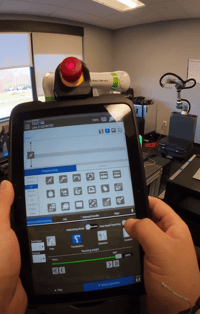
Programming begins by defining key positions. On the CRX, this is as simple as dragging points on the teach pendant:
-
Home position: Drag and drop.
-
Approach point: Enable freehand teaching and physically guide the robot to a safe approach location, especially important for avoiding nearby fixtures like carts or conveyors.
With the robot moved into place, another drag-to-store action records the waypoint. No scripting, no joint-angle tweaking.
2. Teaching the Pick Operation
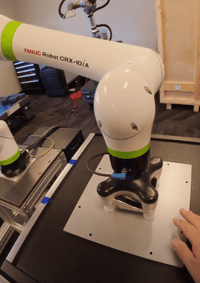
To pick up a plate, the operator simply lowers the robot until the vacuum cups fully seat. Once the seal looks good, the point is captured—again with a drag.
Next, the robot needs to know when to activate the tool. With the OnRobot vacuum gripper, this is done by dragging a “plugin” command into the timeline:
-
Turn on vacuum
-
Add a short hold time (e.g., 0.3 seconds) to confirm the part is secure
These actions replace the manual I/O configuration and timing code that traditional robots often require.
3. Building Safety Into the Motion
Just as important as picking the part is ensuring the robot doesn’t collide with anything on its way out. A departure point is added by reusing the previously taught approach point—an efficient way to enforce safe clearance without extra steps.
From there, the robot is instructed to return to the home position, creating a clean, predictable sequence.
4. Repeat, Then Test
Once the first half of the task is complete, the same quick process is repeated for the drop-off or second location. After that, the full program is ready to test.
Why This Matters
This workflow highlights why cobots have become so appealing for engineers, integrators, and manufacturers:
-
No coding required
-
Fast waypoint teaching
-
Built-in safety and collision-avoidance logic
-
Tooling integration through drag-and-drop commands
The result: rapid deployment, easy adjustments, and a system that’s accessible to technicians of all experience levels.
If you’ve been considering cobots for automation, the CRX programming experience shows just how low the barrier to entry has become. Interested in learning more?